OCR and the Bitter Lesson
All models used in this article are deployed and available for use in the Doubleword Inference API Platform. If you want to recreate the results or run OCR on your own documents sign up today and claim your free $10 worth of credits.
Expert Systems vs The Bitter Lesson
If there is one lesson that has been hammered home by the last few years of language model development, it is this: general-purpose systems that scale with compute tend to beat carefully assembled pipelines of specialist components.
That does not mean the specialist systems were built badly. Usually the opposite. They are often deeply clever. They are built by people who understand the domain, know exactly where the edge cases live, and have spent years patching over failure modes one by one. For a while, that approach can look unbeatable.
Then the scaling laws show up.
A lot of the recent progress in agents has the same shape. Early retrieval systems were built around the idea that you should first run a dedicated search or ranking stack, then hand the curated context to the language model. In plenty of cases, that still works well. But more and more, the best results come from doing something much simpler and much more brutal: give a strong model tools, teach it to use them, and let it search the corpus itself with grep, file browsing, or other general-purpose search tools.
Yes, that required absurd amounts of compute. Billions of GPU hours were burned to achieve this. The Bitter Lesson does not say general methods are cheap. It says that once a method can absorb enough data and compute, hand-designed decompositions start to look suspiciously temporary.
OCR feels like one of the next domains in line.
OCR and the Bitter Lesson
OCR is one of those problems that looks solved right up until you try to use it on real documents.
Clean printed text on a white background? Sure. We have been able to do that for a long time. But production OCR is not about toy scans. It is about dense arXiv pages full of equations, old documents with broken contrast, multi-column layouts, tables with merged cells, footnotes, headers, figures, stamps, and all the miscellaneous violence that the PDF format routinely inflicts on downstream systems.
More broadly, OCR is the task of taking a document that was designed for display and turning it into a serialized representation that is actually useful for computation. That usually means plain text, Markdown, HTML, JSON, or some richer structured format that preserves layout and reading order.
Historically, the field has been dominated by expert systems.
A typical pipeline looks something like this:
- Run layout detection to identify blocks such as paragraphs, tables, images, headers, and footers.
- Run text OCR over selected regions.
- Run specialized table extraction to serialize grids into HTML or Markdown.
- Stitch everything back together with heuristics for reading order and overlaps.
- Add application-specific rules for all the places where the previous four steps disagree.
In the past at Doubleword, we have built pipelines of exactly this flavour using tools like LayoutLM, tesseract, and table-specific models such as Table Transformers. These systems can work very well. In fact, they can be excellent. But they are brittle in a very specific way: the performance of the whole stack depends on each stage making the right local decision, and on the surrounding code guessing correctly how to reconcile the stages when they do not.
This is the hallmark of an expert system. Even when individual modules are neural networks, the overall system is still a hand-composed assembly of narrow components plus heuristics.
Maybe you see where this is going.
OCR is exactly the kind of problem that should eventually yield to the Bitter Lesson. The input is rich, messy, multimodal, and full of long-range dependencies. The output is not just “text”, but a structured rendering of a visual document into a machine-friendly format. That is a very natural fit for large vision-language models.
And by the start of 2026, it looks increasingly like that transition is already underway.
We now have a handful of specialist OCR VLMs, alongside general-purpose VLMs that have become strong enough to do document extraction surprisingly well with prompting alone. In this post, I want to look at how these models perform on complex information extraction and document transcription tasks, and what that says about where OCR is going.
TL;DR: the best VLMs are already capable of extremely high-fidelity document extraction, and they look increasingly likely to become the default way we do OCR.
Why OCR Matters
OCR is economically important in an almost boringly large way.
The obvious use case is digitization. Entire industries still run on PDFs, scans, statements, forms, contracts, technical reports, manuals, and archives that were never designed to be queried programmatically. Turning that mess into structured data is a prerequisite for automation.
But even “digital-first” documents are often not truly machine-friendly. A PDF may be born digital and still be terrible to work with. Information can be visually obvious to a human reader while being awkward or impossible to recover reliably from the underlying representation. Tables are flattened. Reading order is ambiguous. Figures and captions float around. Headers and footers pollute text streams. Nothing is tagged quite the way you wish it was.
That makes OCR and document intelligence important not just for legacy enterprise systems, but also for AI systems themselves.
Agents want programmatic access to documents. They want to search them semantically, grep them literally, edit them, chunk them, cite them, and feed them into downstream workflows. None of that is pleasant when the canonical representation is a PDF. A huge fraction of RAG and agent pipelines starts with some form of OCR or document parsing, because before you can retrieve over a document, you first need to turn it into something retrievable.
This is also where today’s pipelines often fall apart. PDF is a hostile format. Preserving the structural elements that actually matter for meaning is hard, and every application ends up accreting custom logic for its own corner cases. One team needs to recover forms. Another needs tables. Another needs inline math and figures. Another cares desperately about footnotes or section headings. You end up writing a surprising amount of product code for what is, conceptually, “just reading documents”.
The promise of Bitter-Lesson-pilled OCR is not merely better transcription accuracy. It is that we get a more general interface to documents.
Instead of building a brittle pipeline of layout detection, OCR, table models, and postprocessing, you can increasingly just ask a capable multimodal model to produce the representation you want. That does not remove prompting or evaluation work. But it does move effort away from writing custom code and toward specifying the task.
OCR with VLMs
Late 2025 and early 2026 brought a wave of new open source multimodal models that are genuinely interesting for OCR.
On the specialist side, there are now several models trained specifically for document extraction:
DeepSeek-OCR-2olmOCR-2LightOnOCR-2-1B
And then there are the strong general-purpose VLMs, most notably the Qwen3.5 family, which turn out to be surprisingly competitive on document tasks despite not being marketed primarily as OCR systems.
All 4 of these models are available today on the Doubleword Inference API. If you want to try them out yourself sign up and get $10 free credit (enough to rerun these benchmarks!)
If the specialist OCR VLMs win decisively, that suggests OCR remains a distinct vertical where domain-specific training matters most. If the large general-purpose VLMs hold their own, that is a much stronger Bitter Lesson signal: the general model is learning enough about pages, reading order, tables, and mathematical notation that you no longer need a bespoke document stack.
The release of olmOCR also came with OlmOCR-Bench, a benchmark specifically designed around difficult document extraction problems rather than the easy cases OCR systems have mostly been able to handle for years. That makes it much more useful than benchmarks that are saturated by clean machine-printed text.
We benchmarked four models against OlmOCR-Bench, and we also built a viewer for a subset of the benchmark so you can compare source pages and model outputs side by side.
Viewer here: Open the OCR sample viewer
The viewer matters because benchmark scores never tell the whole story. OCR is one of those domains where qualitative inspection is not optional. You care about whether tables are actually usable, whether equations survive, whether reading order feels sane, and whether the output looks like something a downstream model or human could realistically work with.
The Results
OlmOCR-Bench is split into seven challenging categories:
- ArXiv math
- Tables
- Headers and footers
- Multi-column documents
- Long tiny text
- Old scans
- Old math scans
In total, the benchmark covers roughly 1,400 pages. For each page, it defines features that must appear in the extracted text. That means the metric is not simply “did the model produce something plausible”, but “did it preserve the specific information the benchmark considers essential”.
Here are the scores:
| Model | Overall | ArXiv Math |
Headers and Footers |
Small Text |
Multi Columns |
Old Scans |
Old Math Scans |
Tables |
|---|---|---|---|---|---|---|---|---|
| LightOnOCR-2-1B | 73.2% | 88.6% | 21.1% | 80.1% | 84.3% | 40.3% | 84.7% | 86.5% |
| DeepSeek-OCR-2 | 47.1% | 46.0% | 96.1% | 18.6% | 48.4% | 22.6% | 49.6% | 0.2% |
| olmOCR-2-7B-1025-FP8 | 82.0% | 83.1% | 96.8% | 79.4% | 82.7% | 46.6% | 85.4% | 82.2% |
| Qwen3.5-397B-A17B-FP8 | 73.0% | 81.0% | 36.8% | 78.5% | 80.2% | 45.2% | 83.8% | 78.7% |
| tesseract | 35.5% | 0.0% | 39.3% | 69.0% | 55.4% | 19.8% | 0.0% | 0.8% |
A few things jump out immediately.
First, olmOCR-2 is the strongest overall model in this evaluation. It is consistently good across almost every category and does not seem to rely on one or two spectacularly strong areas to carry a weak tail. If you wanted a single model for broad high-fidelity extraction, this benchmark suggests olmOCR-2 is the current leader.
Second, LightOnOCR-2-1B is genuinely impressive for a small model. Its overall score is similar to the large Qwen3.5 model, and it is especially strong on math and tables. The weak point is headers and footers, where it absolutely falls over. That kind of failure mode matters in practice, because header/footer pollution can quietly poison downstream retrieval.
The other notable point is Qwen3.5. A massive general-purpose VLM landing around 73% overall, while being highly competitive on math, tables, and multi-column documents, is a strong sign that document OCR is no longer safely quarantined as a specialist-only domain. Even where it is not the best benchmarked model, it is close enough that the flexibility of a general-purpose model starts to matter.
Eyeball test
If you open the viewer and spend a few minutes looking at the raw outputs, the story gets more interesting than the table of scores suggests.
Tables
Qwen3.5, LightOnOCR, and olmOCR are all remarkably good at rendering tables into HTML. Not perfect, but far beyond what I would have expected from a system that is not explicitly built as a multi-stage table parsing stack. The outputs are often directly usable, and even when they are imperfect, they are usually close enough that a lightweight cleanup pass would finish the job.
DeepSeek-OCR-2 was the outlier here. Its HTML table rendering was so poor that I initially assumed I had made a mistake. What it was very good at, though, was finding table boundaries. In the viewer, I ended up leaning into that behaviour by cropping and including tables as document elements rather than asking it to perfectly serialize them. That is still useful. It is just a different interface than the benchmark happens to reward.
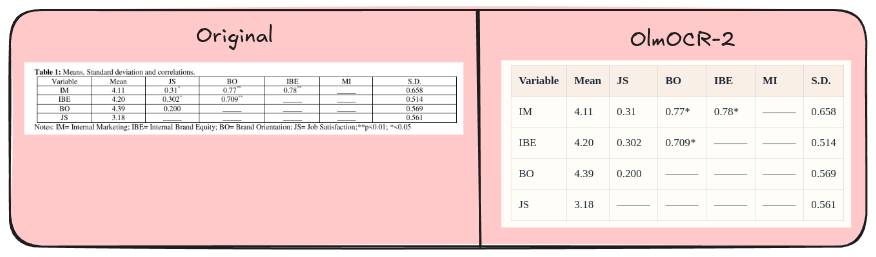
olmOCR-2 preserves the table structure cleanly enough that the extracted HTML is close to directly usable.
Math
All of the modern multimodal models in this comparison do a strong job of rendering math into LaTeX. That does not mean they are flawless. Small notation errors still matter. But the jump in usefulness compared to tesseract is enormous.
For technical documents, scientific publishing, and any workflow involving equations, that is a massive upgrade.
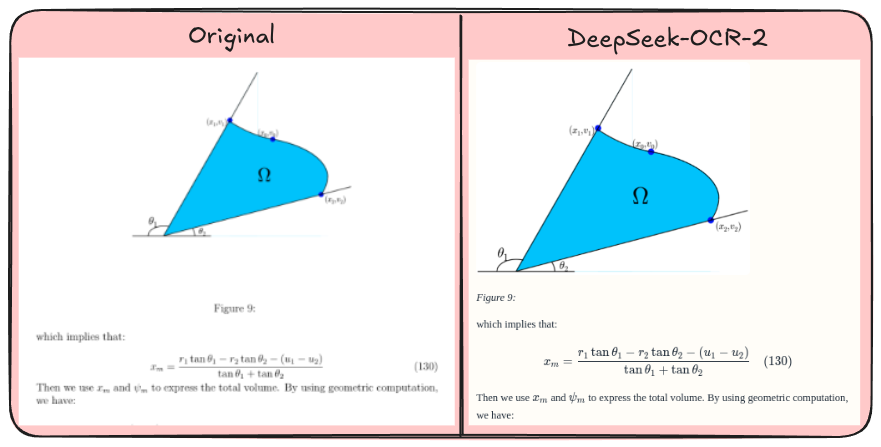
DeepSeek-OCR-2 handles math-heavy layouts well, preserving both the diagram context and the nearby equation.
Image inputs
One of the more underrated capabilities of the large VLMs is how naturally they handle images and figures inside the document stream.
Qwen3.5 and DeepSeek-OCR-2 are both very good at identifying image regions and inserting them into the Markdown output in roughly the right place. That may sound small, but it is exactly the sort of thing that used to require a separate layout model plus a bunch of reading-order heuristics.
In old-school pipelines, you would first detect figure boxes, then separately decide where those figures belong relative to the surrounding text, then decide how to represent them in the serialized output. Every step is an opportunity to get the ordering wrong.
The VLM approach is much cleaner. The model sees the whole page and can decide, in one pass, where the figure belongs in the narrative flow of the document.
This is one of those cases where the benchmark score only partly captures what matters. A system that preserves the structure of the page well enough for a downstream model or human to read it naturally has real value, even if it occasionally formats a block in a way the benchmark does not prefer.
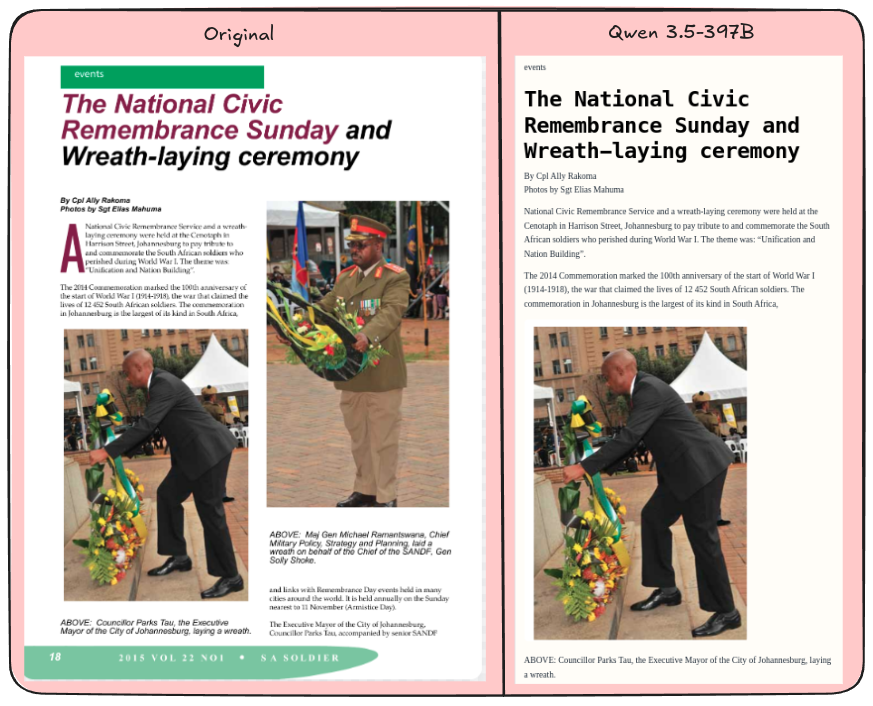
Qwen 3.5-397B keeps the article readable while placing the embedded image in the right position in the flow.
dwocr
At Doubleword, we have packaged this style of OCR into a tool called dwocr.
dwocr runs PDF OCR against the Doubleword API using the Qwen family of models and writes the result out as Markdown. In practice, that means taking a PDF and turning it into a machine-friendly document with normal text, tables rendered as HTML, equations rendered as LaTeX, and figure regions represented as Markdown image tags.
If you enable image rendering, dwocr will also crop those figure regions out of the source page and rewrite the Markdown so the output points at real image files on disk. The result is a clean serialized representation of the original PDF that is much easier to search, chunk, inspect, and feed into downstream systems than the raw document itself.
Cost
A lot of interesting document corpora are not a few thousand pages. They are millions, hundreds of millions, or billions of pages. At that scale, cost dominates almost everything else. A system can be beautiful in a demo and unusable in production if the unit economics are wrong.
For this benchmark, recreating comparable outputs with AWS Textract using layouts plus tables would have cost about $21. If you needed query mode to extract specific fields, the total would have been closer to $30.
| System | Cost |
|---|---|
| Qwen3.5-397B on Doubleword | $2.14 |
| Small OCR Models | < $0.50 |
| Textract (Tables + Layout) | $21 |
| Textract (Tables + Layout + Queries) | $28 |
That is for just ~1,400 pages.
Those economics are not survivable if your actual problem is a billion-page archive.
By contrast, running Qwen3.5-397B on the Doubleword batched inference platform cost just $2.14 for the entire OlmOCR-Bench run, which is more than a 10x reduction relative to the Textract setup above. The smaller specialist models were cheaper still, each coming in under $0.50 for the benchmark.
Conclusion
There is no free lunch here. Large multimodal models still make mistakes. Some edge cases remain stubborn. Benchmarks are imperfect. Prompting matters. But the trajectory is now pretty clear: general multimodal systems are getting good enough, cheap enough, and flexible enough that the old hand-built OCR stack increasingly looks like a temporary local optimum.
The Bitter Lesson is coming for documents too.